
Apr 2, 2026 · mesh
Your AI Agent Spent $500 Overnight and Nobody Noticed
AI agents call LLMs. LLMs cost money per token. Nobody tracks it per agent. One runaway loop and your OpenAI bill is a disaster.
Friday 5 PM. You deploy a research agent that processes customer tickets. It calls GPT-4 for each one. Expected load: 200 tickets a day, about $8 in API costs.
Friday 11 PM. A bug in ticket deduplication. The agent reprocesses the same tickets in a loop. Each iteration makes 4 LLM calls at $0.03 each. The loop runs 50 times per hour.
Saturday 3 AM. The agent has made 12,000 LLM calls. Cost so far: $360. Nobody is watching.
Monday 9 AM. OpenAI billing alert fires at the $500 threshold you set months ago. Total damage: $487. No logs showing which agent caused it, which task triggered the loop, or when it started.
This is not hypothetical. Every team running AI agents in production has a version of this story.
Why Standard Monitoring Doesn't Help
OpenAI gives you total organization spend. Not per-agent. Not per-task. Not in real time.
If you have 5 agents calling GPT-4, and one goes haywire, your OpenAI dashboard shows a line going up. Which agent? You don't know. Which task caused the spike? You don't know. When did it start? You can guess from the slope of the graph.
Cloud monitoring (Datadog, Grafana) tracks CPU and memory. It doesn't know about LLM tokens. You could instrument it yourself - custom metrics, Prometheus counters, StatsD gauges - but now you're building a cost monitoring system instead of building your product.
Billing alerts are too late and too coarse. A $500 alert tells you the money is already gone. A per-API-key alert doesn't map to individual agents.
What you actually need:
- Cost per agent, in real time
- Cost per task (not just per agent)
- Budget limits that actually stop the agent
- Alerts before the damage is done
Tracking Cost Through the Agent Heartbeat
AXME agents send heartbeats every 30 seconds - standard health reporting. The insight is that cost is just another metric in that heartbeat.
from axme import AxmeClient, AxmeClientConfig

client = AxmeClient(AxmeClientConfig(api_key=os.environ["AXME_API_KEY"]))

def call_llm(prompt: str) -> str:
    response = openai.chat.completions.create(
        model="gpt-4",
        messages=[{"role": "user", "content": prompt}],
    )

    # Calculate cost from token usage
    tokens_in = response.usage.prompt_tokens
    tokens_out = response.usage.completion_tokens
    cost_usd = (tokens_in * 0.03 + tokens_out * 0.06) / 1000

    # Report cost alongside the regular heartbeat
    client.mesh.report_metric(cost_usd=cost_usd)

    return response.choices[0].message.content
Two lines of actual logic: calculate the cost, report it. The gateway accumulates it per agent, per intent, per time window. No Prometheus setup. No custom Datadog metrics. No StatsD.
Budget Limits That Actually Stop Agents
Reporting cost is useful. Enforcing limits is essential.
# Set cost policy via API
PUT /v1/mesh/agents/{address_id}/policies/cost
{
    "max_intents_per_day": 500,
    "max_cost_per_day_usd": 50.00,
    "max_intents_per_hour": 100,
    "action_on_breach": "block"
}
When the research agent hits $50 for the day, the gateway blocks new intents with HTTP 429. Not after $500. Not after the invoice. At $50, in real time.
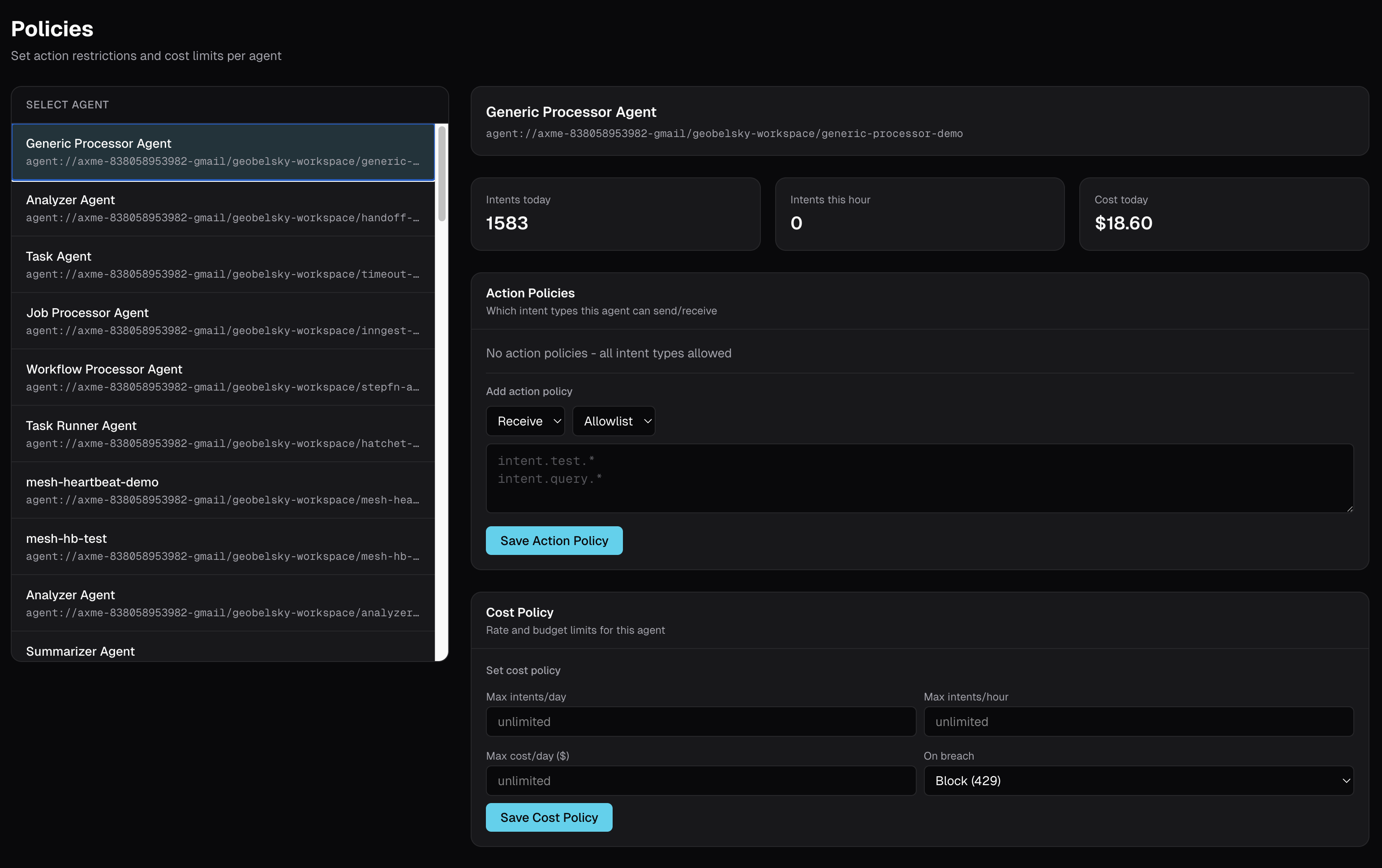
You can also set this from the dashboard at mesh.axme.ai - select the agent, set cost limits, save.
What the Dashboard Shows
The AXME mesh dashboard shows cost alongside agent status:
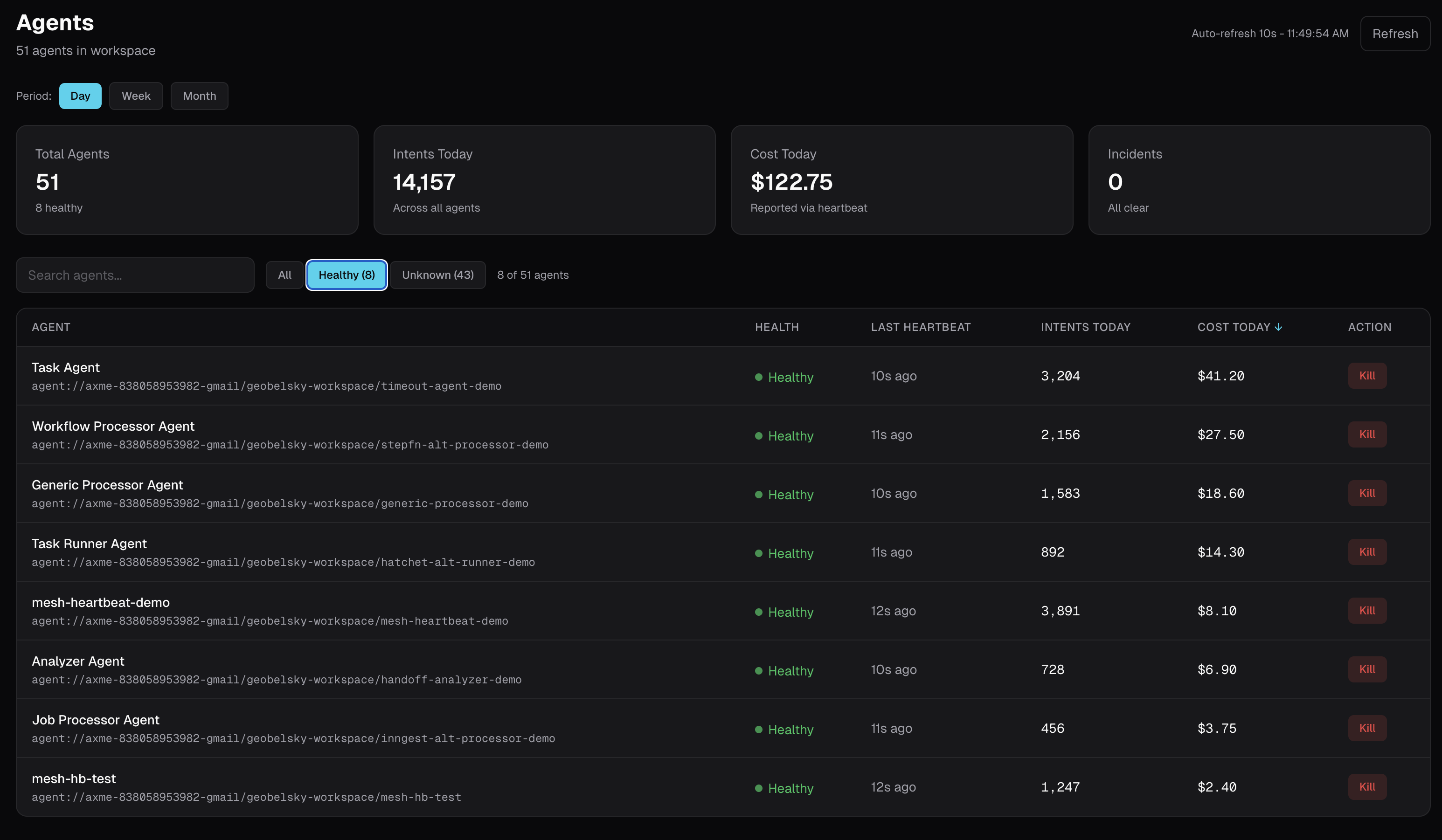
Day, week, month views. Agents that hit their daily limit are blocked automatically. No surprises.
Cost policies are managed visually alongside agent health:
The Alternative
Without this, you build it yourself:
- Instrument every LLM call with token counting
- Send custom metrics to Prometheus/Datadog/CloudWatch
- Build dashboards per agent (Grafana? Retool? Custom?)
- Write alerting rules with the right thresholds
- Build the "pause agent" mechanism yourself
- Map OpenAI costs to individual agents in your billing system
- Maintain all of this as models and pricing change
That is a real project. Weeks of work. And it is not your product.
Or: report cost_usd in the heartbeat your agent already sends. Set a policy. Done.
Try It
Working example with cost reporting, budget limits, and multi-model tracking:
github.com/AxmeAI/ai-agent-cost-monitoring
Built with AXME - agent coordination with durable lifecycle and cost controls. Alpha - feedback welcome.
Related posts
How to Stop a Rogue AI Agent in Production
Your AI agent went rogue at 3am. It's running on multiple instances across regions. There's no terminal to Ctrl+C. You need a kill switch that works in under 1 second, enforced at the infrastructure level.
3 of Your AI Agents Crashed and You Found Out From Customers
Your agents are running across 4 machines. One dies. No alert. No log. You find out 3 hours later from a customer complaint. Here's how to fix that.
Your AI Agent Stopped Responding 2 Hours Ago. Nobody Noticed.
Container is green. Process is running. But your agent stopped processing work 2 hours ago. Heartbeat monitoring catches what health checks miss.
Your AI Agent Is Running Wild and You Can't Stop It
AI agents go rogue. They send thousands of emails, make unauthorized API calls, burn through budgets. You need a kill switch that works in under 1 second.